
Last reviewed: September 5, 2026.
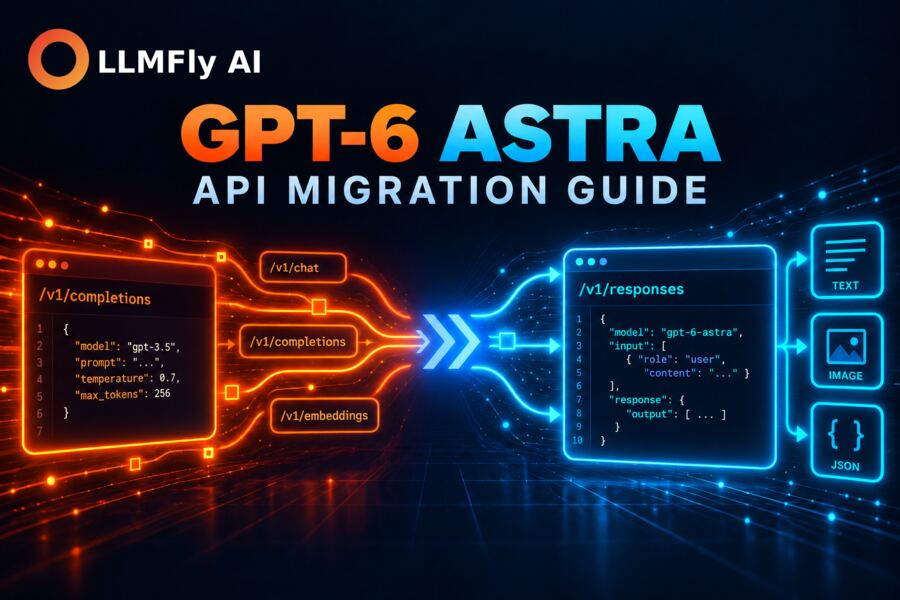
Quick answer: migrating to GPT-6 Astra is not always a one-line model-name change. Basic text requests may move with few edits, but production applications that use tools, custom sampling parameters, long-running agents, or log probabilities need additional work. GPT-6 Astra requires the Responses API for tool calling, does not support reasoning_effort: "none", and does not accept custom temperature, top_p, or logprobs. This GPT-6 Astra API migration guide shows what breaks, what to replace, and how to test the migration safely. It also explains how developers can use LLMFly AI to evaluate discounted Astra access alongside fallback models without rebuilding every client integration.
LLMFly AI discount: as checked in Model Plaza on September 5, 2026, the GPT-6 Astra route is listed at 0.3× the official rate. For requests at or below 272K tokens, that means $3 per million input tokens and $15 per million output tokens, compared with OpenAI’s $10 and $50 standard prices. Cache reads are listed at $0.30 per million tokens. Verify the live rate in LLMFly AI Model Plaza before deployment because availability and account pricing can change.
GPT-6 Astra API migration checklist
| Current implementation | Drop-in migration? | Required action |
|---|---|---|
| Simple text generation | Usually | Change the model ID, set a supported reasoning level, and rerun output tests |
| Chat Completions with tools | No | Move the tool workflow to the Responses API |
reasoning_effort: "none" |
No | Use low or a higher supported level |
Custom temperature or top_p |
No | Remove the parameter and retest output consistency |
Application logic based on logprobs |
No | Replace it with task-specific evaluation or confidence checks |
| Long-running tool agent | Not safely | Add time, spend, tool-call, and action limits; consider background and async execution |
| Latency-sensitive production traffic | Only after testing | Benchmark wall-clock time and add retry and fallback rules |
| Existing OpenAI SDK client | Often | Update the SDK and verify that every endpoint used by the route is supported |
The fastest safe approach is to treat Astra as a new execution environment, not merely a more capable checkpoint. Clone representative traffic, migrate the request contract, validate the output, and only then change production routing.
What changed in the GPT-6 Astra API?
OpenAI describes GPT-6 Astra as its model for difficult end-to-end work across reasoning, coding, computer use, research, and document creation. The model supports a context window of 1,050,000 tokens, up to 128,000 output tokens, image input, structured outputs, and a broad set of tools through the Responses API. It does not support audio or video input or output, and it cannot currently be fine-tuned.
The migration-relevant changes are more important than the headline specifications:
- Reasoning begins at
low. Astra supportslow,medium,high,xhigh, andmax. Thenoneoption is not supported. - Sampling controls are restricted. Custom
temperatureandtop_pvalues are not supported. - No log probabilities. Applications that use
logprobsfor ranking, confidence estimates, or thresholding need another evaluation method. - Tool calling requires Responses. Existing Chat Completions tool workflows must migrate to the Responses API.
- Long-running work has new controls. Astra introduces async tool calling, mid-turn steering, and reasoning-effort updates during a conversation.
- Agent work can be monitored. Supported tool-using Responses requests may be checked asynchronously for potential misalignment. A check can raise a safety alert or stop a conversation for review.
These are documented API behaviors, not assumptions based on launch demos. They should be represented explicitly in your compatibility tests.
Can you replace the model name and keep your existing code?
For a simple prompt-to-text application, possibly. If your integration already uses the Responses API and does not send unsupported parameters, the minimum request is straightforward:
import OpenAI from "openai";

const client = new OpenAI({
  apiKey: process.env.OPENAI_API_KEY
});

const response = await client.responses.create({
  model: "gpt-6-astra",
  reasoning: { effort: "medium" },
  input: "Review this deployment plan and identify the three highest-risk assumptions."
});

console.log(response.output_text);
However, a request being accepted does not prove that the migration is complete. Your parser may assume a Chat Completions response shape. Your monitoring may count only visible output tokens. Your latency timeout may be too short for a higher reasoning level. Your prompt may rely on temperature to create variants. A production migration must test the entire request-response lifecycle.
If you evaluate Astra through LLMFly AI, use the route and model identifier shown in Model Plaza. For supported OpenAI-compatible requests, the client can be configured with an LLMFly AI project key and base URL:
const client = new OpenAI({
  apiKey: process.env.LLMFLY_API_KEY,
  baseURL: "https://app.llmfly.ai/v1"
});
Endpoint and feature support can vary by route. Confirm that the selected Astra route supports the Responses API and every tool your application needs before treating it as a drop-in replacement. This verification is especially important for new model launches, when provider availability and route capabilities can change.
Migrating GPT-6 Astra tool calling to the Responses API
This is the most important breaking change for agent developers. OpenAI’s official function-calling guide states that GPT-6 Astra requires the Responses API for tool calling. A legacy Chat Completions request with a tools array should not be carried forward unchanged.
A basic Responses API function definition looks like this:
const response = await client.responses.create({
  model: "gpt-6-astra",
  reasoning: { effort: "medium" },
  input: "Check order 1842 and tell me whether it has shipped.",
  tools: [{
    type: "function",
    name: "get_order_status",
    description: "Return the current status of an order.",
    parameters: {
      type: "object",
      properties: {
        order_id: { type: "string" }
      },
      required: ["order_id"],
      additionalProperties: false
    },
    strict: true
  }]
});
Your application still executes developer-defined functions. It must locate the function call in the response output, validate the arguments, run the tool with appropriate permissions, and return the result using the original call ID. Astra’s improved reasoning does not remove that responsibility.
During migration, test at least five tool outcomes:
- a valid call with valid arguments;
- an invalid or incomplete argument set;
- a tool timeout;
- a tool result that contradicts the model’s initial assumption;
- a consequential action requiring user approval.
Keep tool schemas narrow. Separate read-only tools from write tools. Validate all arguments on the server. For payments, deletion, publication, permission changes, or external communication, require a confirmation gate immediately before execution. A more capable model can plan longer workflows, but your application still owns authorization.
Which GPT-6 Astra reasoning effort should you use?
The correct default is not max. Higher reasoning can improve hard tasks, but it can also increase latency and token use. Choose the lowest level that meets the task’s acceptance threshold.
| Reasoning level | Good starting use | What to measure |
|---|---|---|
low |
Classification, extraction, short transformations, simple tool selection | Schema pass rate and latency |
medium |
Routine coding, analysis, and multi-step tool work | Accepted-result rate and retries |
high |
Difficult debugging, research synthesis, and long planning | Human repair time and total cost |
xhigh |
Failure-sensitive technical work with strong validation | Marginal quality gain over high |
max |
Exceptional tasks where failure costs substantially more than inference | Whether the final gain justifies time and spend |
Astra also supports changing reasoning effort during a conversation with a configuration_update. This is useful when early steps are routine but a later step becomes difficult. OpenAI documents this capability for standard, single-agent mode. It changes reasoning effort only and preserves the original prompt prefix for caching.
That enables a practical cost policy: begin at low or medium, escalate only after a failed validator, ambiguous evidence, repeated tool error, or high-impact decision. The same principle applies at the model layer. LLMFly AI lets a team keep Astra and lower-cost models available through one access layer, so an application can use an economical model for routine work and reserve discounted Astra access for the difficult tail.
How async tool calling changes long-running agents
Traditional tool calling pauses model work while the application runs a function. With Astra, developer-defined function and custom tools can be marked async: true. The model may continue reasoning, call other tools, or answer independent parts of the task while the asynchronous tool is running. Your application remains responsible for executing the tool, tracking pending calls, and returning each result with the correct call_id.
This is useful when a workflow contains a slow database query, code build, external analysis job, or batch operation that does not block every other step. It is not automatically useful for every tool. OpenAI notes that async execution applies to functions and custom tools run by your application, not hosted built-in tools. In multi-agent mode, async tools should not be combined with parallel tool calls.
Before enabling it, answer four questions:
- Can later steps safely proceed without the pending result?
- How will your application recover an unfinished call after a process restart?
- What prevents duplicate execution when a result is retried?
- What total tool and inference budget applies while several calls remain open?
Use idempotency keys for write operations, persist pending call IDs, and define a terminal timeout. Async execution can reduce wall-clock time, but unmanaged concurrency can increase both spend and failure complexity.
Mid-turn steering is not cancellation
GPT-6 Astra supports mid-turn steering through a WebSocket connection to the Responses API. A user can add a requirement or redirect the model while a response is still running. This is valuable for long research, coding, or computer-use sessions where waiting for the whole task to finish would waste time.
But steering has clear boundaries: it does not rewrite output already sent, undo earlier actions, or cancel tools that have already started. If a user says “do not send that email” after the send tool has executed, steering cannot reverse it. Consequential tools therefore still require approval before execution, and applications still need a separate cancellation design for work that can be stopped.
A safe interface should show pending actions, completed actions, and cancellable actions separately. Do not label a steering input as a universal stop button.
Handling safety stops, 429 errors, and model overload
Longer agent trajectories create more failure modes than a normal completion. Astra’s supported tool-using requests can be checked by OpenAI’s misalignment monitoring. A check may produce a safety alert or stop a conversation for review. This should be handled as a distinct application state, not as a generic network timeout.
OpenAI also distinguishes between two capacity-related API errors:
429withslow_downmeans traffic increased too quickly.503withserver_is_overloadedmeans temporary model overload.
When a Retry-After header is present, wait at least that long. Otherwise, use exponential backoff with jitter. Do not immediately send the same expensive request through an uncontrolled retry loop.
async function withBackoff(run, maxAttempts = 4) {
  for (let attempt = 0; attempt < maxAttempts; attempt++) {
    try {
      return await run();
    } catch (error) {
      const retryable = error.status === 429 || error.status === 503;
      if (!retryable || attempt === maxAttempts - 1) throw error;

      const retryAfterMs = Number(error.headers?.["retry-after"] || 0) * 1000;
      const backoffMs = Math.min(1000 * 2 ** attempt, 15000);
      const jitterMs = Math.floor(Math.random() * 250);
      await new Promise(resolve =>
        setTimeout(resolve, Math.max(retryAfterMs, backoffMs + jitterMs))
      );
    }
  }
}
For production availability, add a tested fallback rather than discovering one during an outage. A gateway such as LLMFly AI is most useful here when it gives the application access to multiple eligible models through a consistent authentication and billing layer. The fallback should still be explicit: record which model answered, rerun validators, and never assume another model has identical tool behavior.
Control context before it crosses 272K tokens
Astra’s million-token context window does not mean every request should contain a million tokens. OpenAI applies long-context pricing to the entire request after input exceeds 272,000 tokens: input and cached-input rates double, while output rises to 1.5× the short-context rate. Retrieval, compaction, and context pruning are therefore part of migration engineering.
Before sending a large repository or document archive:
- retrieve the files most likely to contain the answer;
- remove generated artifacts, vendored dependencies, and duplicate documents;
- keep stable instructions and shared references cache-friendly;
- compact completed conversation stages;
- calculate the full-request cost before crossing 272K.
For a detailed cost model, including cache writes, Batch, Flex, Fast mode, and LLMFly AI discounts, read our GPT-6 Astra API pricing and 272K context guide.
A production-safe Astra routing policy
The strongest migration pattern is often selective routing rather than replacing every existing model. Start with a lower-cost model for routine steps and escalate to Astra when difficulty or failure cost crosses a measurable threshold.
| Signal | Recommended action | Reason |
|---|---|---|
| Simple, validated transformation | Keep the economical default | Astra’s additional capability may not change acceptance |
| Repeated validator failure | Escalate to Astra | Higher reasoning cost may be cheaper than more retries |
| Long cross-application workflow | Consider Astra from the start | Early execution errors compound across steps |
| Consequential write action | Astra plus human approval | Capability is not authorization |
| Astra 429 or 503 after controlled retry | Use a tested fallback | Preserves availability without retry storms |
| Context approaching 272K | Retrieve or compact first | Avoids unnecessary long-context repricing |
Our separate GPT-6 Astra vs GPT-5.6 Sol comparison explains where Astra’s higher list price is most likely to improve completed-task economics. In practice, developers can create separate project keys in LLMFly AI, run the same evaluation set against Astra and fallback candidates, and compare route-level usage before changing the production default.
Seven tests to run before production
- Request compatibility: remove unsupported parameters and confirm the response parser handles Responses API output.
- Tool contract: test valid, invalid, delayed, contradictory, and duplicate tool results.
- Reasoning policy: compare low, medium, and high on the same acceptance tests before considering xhigh or max.
- Budget limits: cap input, output, reasoning, wall-clock time, and tool calls per task.
- Interruption behavior: verify what steering can change and what requires a separate cancellation path.
- Retry and fallback: simulate 429, 503, timeout, safety review, and an unavailable Astra route.
- Accepted-result economics: count retries, tool fees, human repair time, and failed tasks—not only token price.
Run these tests with real workload samples. A polished demo prompt is not a migration test. LLMFly AI can reduce the friction of comparing model routes and offers discounted Astra access, but the final routing decision should still come from your own completion rate, latency, and cost per accepted result. Check current availability and account pricing in LLMFly AI Model Plaza rather than hard-coding an unverified discount percentage.
Frequently asked questions
Does GPT-6 Astra support the Chat Completions API?
The model catalog lists Chat Completions as an endpoint, so basic compatible requests may use it. However, OpenAI explicitly requires the Responses API for GPT-6 Astra tool calling. Agent and function-calling integrations should migrate to Responses.
Does GPT-6 Astra support temperature and top_p?
No custom temperature or top_p values are supported. Remove these parameters and evaluate consistency with task-specific tests, structured outputs, validators, and clear prompts.
What reasoning effort should I use for GPT-6 Astra?
Begin with low for simple deterministic work or medium for normal coding and tool workflows. Move to high, xhigh, or max only when measured quality gains justify the additional latency and cost.
Can GPT-6 Astra change reasoning effort during a conversation?
Yes. OpenAI documents configuration_update for changing reasoning effort while preserving the prompt prefix. It is supported for GPT-6 Astra in standard, single-agent mode.
Can I access GPT-6 Astra at a discount through LLMFly AI?
Yes. As checked on September 5, 2026, LLMFly AI Model Plaza lists GPT-6 Astra at a 0.3× rate: $3 per million input tokens, $15 per million output tokens, and $0.30 per million cache-read tokens for requests at or below 272K. The displayed long-context rates are $6 input, $22.50 output, and $0.60 cache read per million tokens. Check the live Model Plaza before budgeting because route availability and account pricing can change.
Bottom line
A safe GPT-6 Astra API migration starts with the request contract. Move tool calling to the Responses API, remove unsupported sampling and log-probability parameters, choose reasoning effort deliberately, and add controls for long-running execution. Then test retry, fallback, context size, and consequential actions with real production examples.
LLMFly AI makes that evaluation easier by putting a currently listed 0.3× Astra route and alternative models behind one developer-oriented access layer. That does not eliminate integration testing; it makes the resulting architecture more flexible. Use Astra where its end-to-end reliability changes the outcome, keep economical fallbacks for routine work, and measure the cost of accepted results rather than the price of a single request.
Create an LLMFly AI account to test GPT-6 Astra with a project key, then compare its live route price and workload results with the alternatives in Model Plaza.
Leave a Reply